How can I try on clothes from Depop before buying?
nista lists Depop among the shopping sites you can use with its free Chrome extension. Create your avatar and try a clear product image from a listing in desktop Chrome. Seller photos determine what the preview can show: our example below uses a back-only jeans photo, so its generated front details are inferred. Ask for measurements and front-and-back photos before buying.
Key takeaways
- Depop is a company-listed shopping example; a single image test does not establish compatibility with every listing.
- Your avatar comes from a few photos for a visual preview.
- Use a clear product photo and compare the generated details with the original before buying.
- nista is 100% free, with no hidden paywalls or subscriptions.
- On a resale marketplace, the seller's measurements matter more than the size on the label.
What our Depop image test showed
Tested October 12, 2026. Product: vintage Levi's 505 jeans listing. We used a fictional adult demo photo, created an avatar through nista's production onboarding, then submitted the product image to nista's production service using its accurate generation profile. The result below is the unchanged image returned by nista.
We used a back-only product photo from a vintage Levi's 505 listing. The accurate-mode result shows light blue jeans from the front, but the front pockets, fly and other unseen details were generated rather than confirmed from that photo. An earlier fast-mode result placed rear-pocket details on the front. A convincing-looking preview cannot reveal details that the seller never photographed.
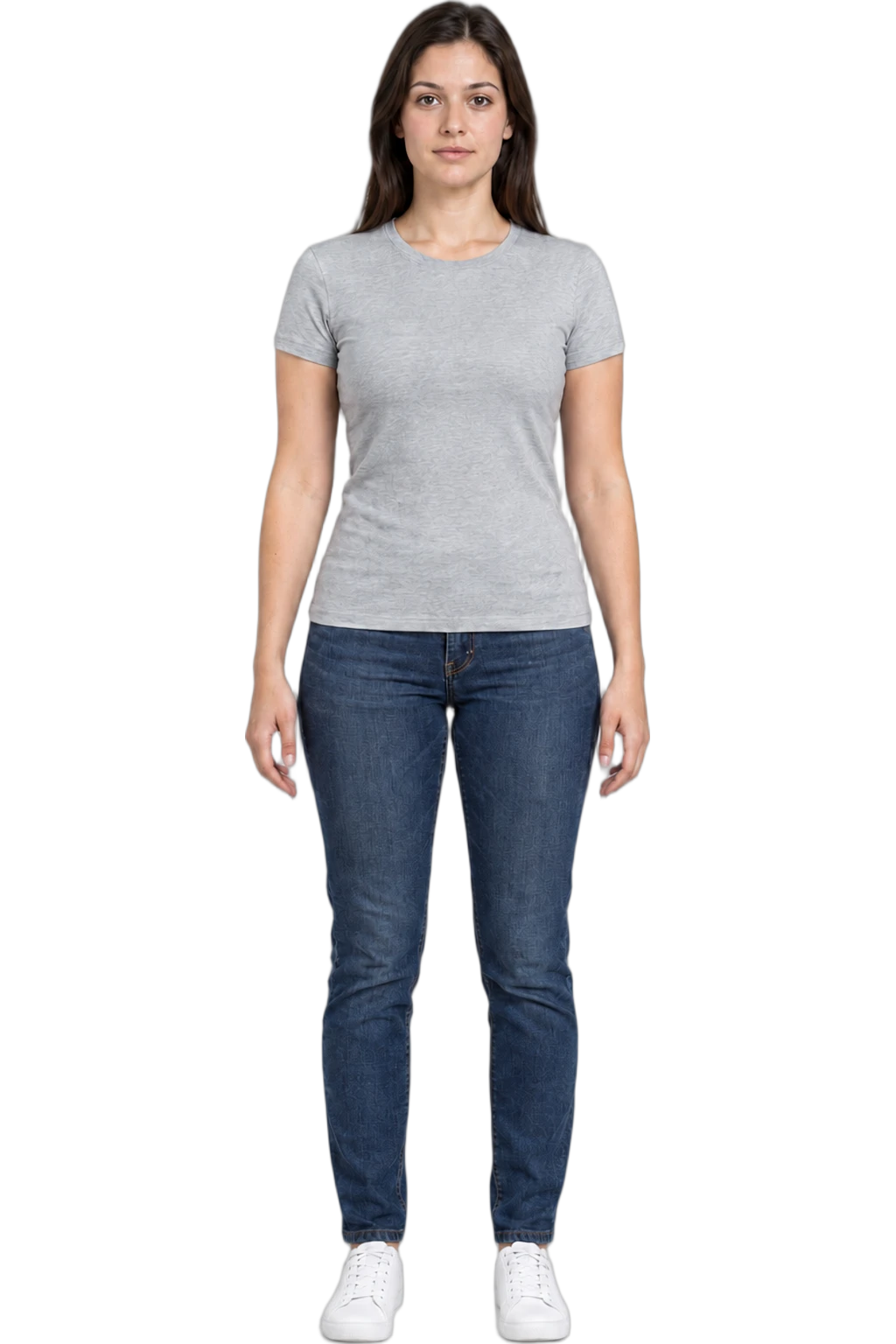
Before: synthetic demo avatar
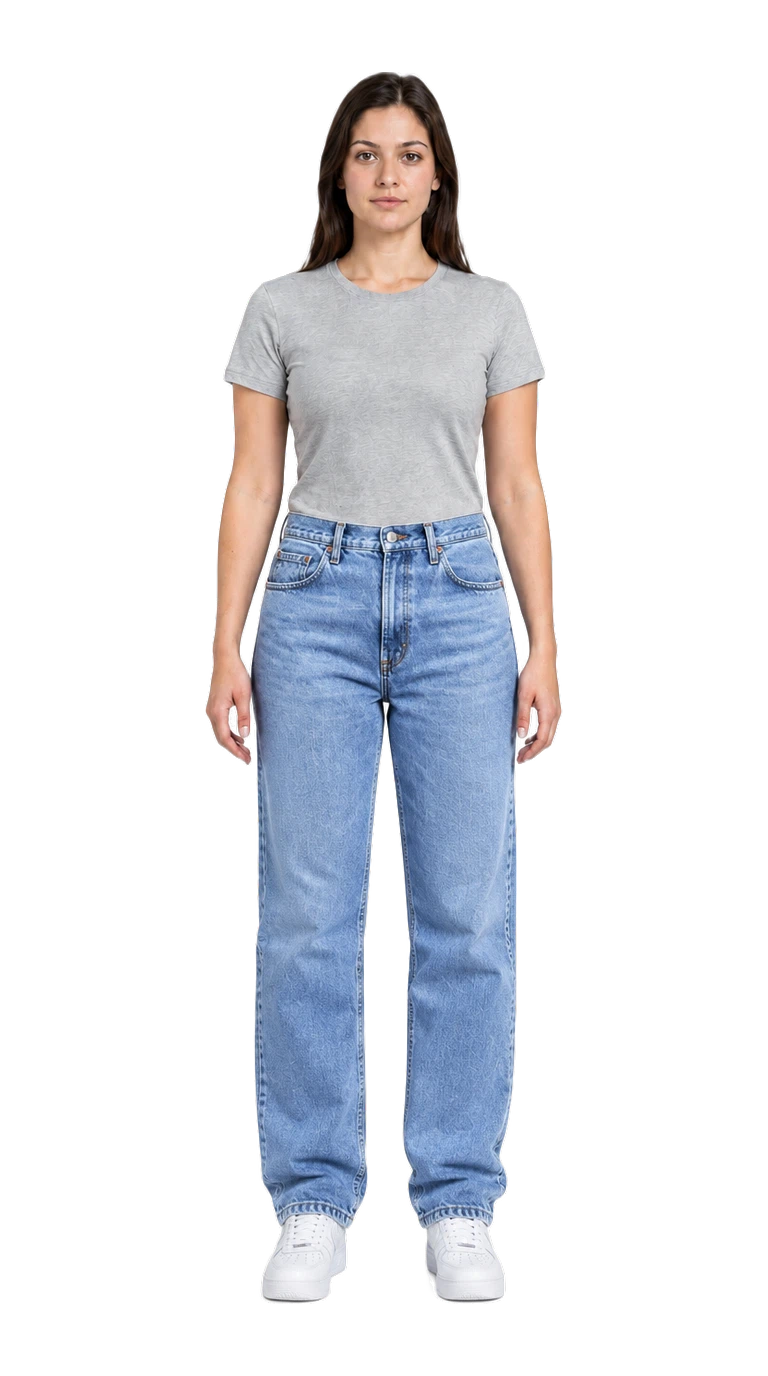
After: actual nista output
We verified that the supplied image could generate a result, not the listing's current availability, condition, measurements or live extension controls. Choose a clear front image for a front-view preview and ask the seller for any missing views.
How to try on Depop items with nista
- Install nista and create your avatar. Follow the installation guide, then complete the photo setup in nista.
- Open Depop in Chrome. Browse depop.com and open a listing you like.
- Use the try-on control when available. Select a clear image of the item and inspect the result.
- Check the listing details. Read the seller's description, size, condition, and any measurements they've included.
- Message the seller if anything is missing. Ask for measurements before you buy, then compare them with a piece you own that fits well.
Why trying on matters more for resale and one-off pieces
Depop is a resale marketplace: individual sellers list their own items, and many of those items are one of a kind. That changes how you shop. There usually aren't other sizes to fall back on, there may be no reviews for that exact piece, and photos are taken by the seller, often on a hanger, laid flat, or on someone with a different build from yours.
Size labels are less reliable too. Vintage sizing differs from current sizing, clothes may have shrunk or stretched with wear, and a piece may have been altered. A virtual try-on helps you answer the first question (do I like how this looks on me?), and the seller's measurements answer the second (will it actually fit?).
Depop shopping and fit tips
- Ask for flat measurements. Pit-to-pit, length, waist, rise, and inseam are the most useful. Measurements vary by seller, so ask how they measured if it's unclear.
- Compare against clothes you already own. Lay a similar piece that fits you flat, measure it the same way, and compare. Our guide on how to know if clothes will fit online walks through this.
- Read the condition notes and zoom into photos. Look for mentions of alterations, stretching, or shrinkage, which can change the fit from what the label suggests.
- Check the listing's shipping and return terms. Policies depend on the seller and the platform, so read them on the listing and Depop's help pages before you pay.
- Think about what you'll wear it with. One-off finds work best when they fit into what you already have. See how to make new outfits from clothes you own.
What a try-on can and can't tell you about a secondhand item
nista describes its previews as keeping your proportions, but our example above also shows why a generated image must be checked against the original product photo. Use it for visual exploration, not a measured fit prediction. Fabric feel, stretch, construction and the size you should order still require product information and your own measurements. Read how accurate is nista for the general limits.
Try on your next Depop find
When there's only one of something, you want to be sure before you buy. Create your free nista avatar and press "try it on" on the next Depop listing you're eyeing.
Frequently asked questions
Does nista work on Depop?
nista lists Depop as a shopping example. Our dated image-generation check below is not a guarantee for every product or a verification of live extension controls.
Is nista free to use on Depop?
Yes. nista is 100% free with no hidden paywalls or subscriptions.
Why is a virtual try-on useful for secondhand clothes?
Many Depop items are one-off pieces listed by individual sellers, so you often can't compare reviews or other sizes; seeing the item on your avatar helps you judge the look first.
Should I still ask the seller for measurements?
Yes. Size labels on secondhand and vintage clothes can be unreliable, so ask the seller for flat measurements and compare them with clothes you own.