How can I try on Aritzia clothes virtually before buying?
nista lists Aritzia among the stores you can shop with its free Chrome extension. Create your avatar, then look for the try-on control on an Aritzia product page in desktop Chrome. The example below is a real production-generated dress preview using a synthetic person; it is a visual illustration, not evidence that a particular size will fit.
Key takeaways
- Aritzia is a company-listed shopping example; a single image test does not establish compatibility with every listing.
- One avatar, made from a few photos, can be reused across supported stores.
- Use a clear product photo and compare the generated details with the original before buying.
- nista is 100% free, with no hidden paywalls or subscriptions.
- Use the try-on to compare silhouettes, and the product page's size guide to pick a size.
What our Aritzia image test showed
Tested October 12, 2026. Product: Subtext Poplin Dress. We used a fictional adult demo photo, created an avatar through nista's production onboarding, then submitted the product image to nista's production service using its accurate generation profile. The result below is the unchanged image returned by nista.
We submitted an image of Aritzia's Subtext Poplin Dress and selected the dress. The returned image shows a white sleeveless, button-front dress on our demo avatar. The product page describes a sleeveless cotton-poplin shirt dress, but we could not independently download its source image for a detailed side-by-side visual comparison. We therefore do not claim that every seam or proportion was reproduced accurately.
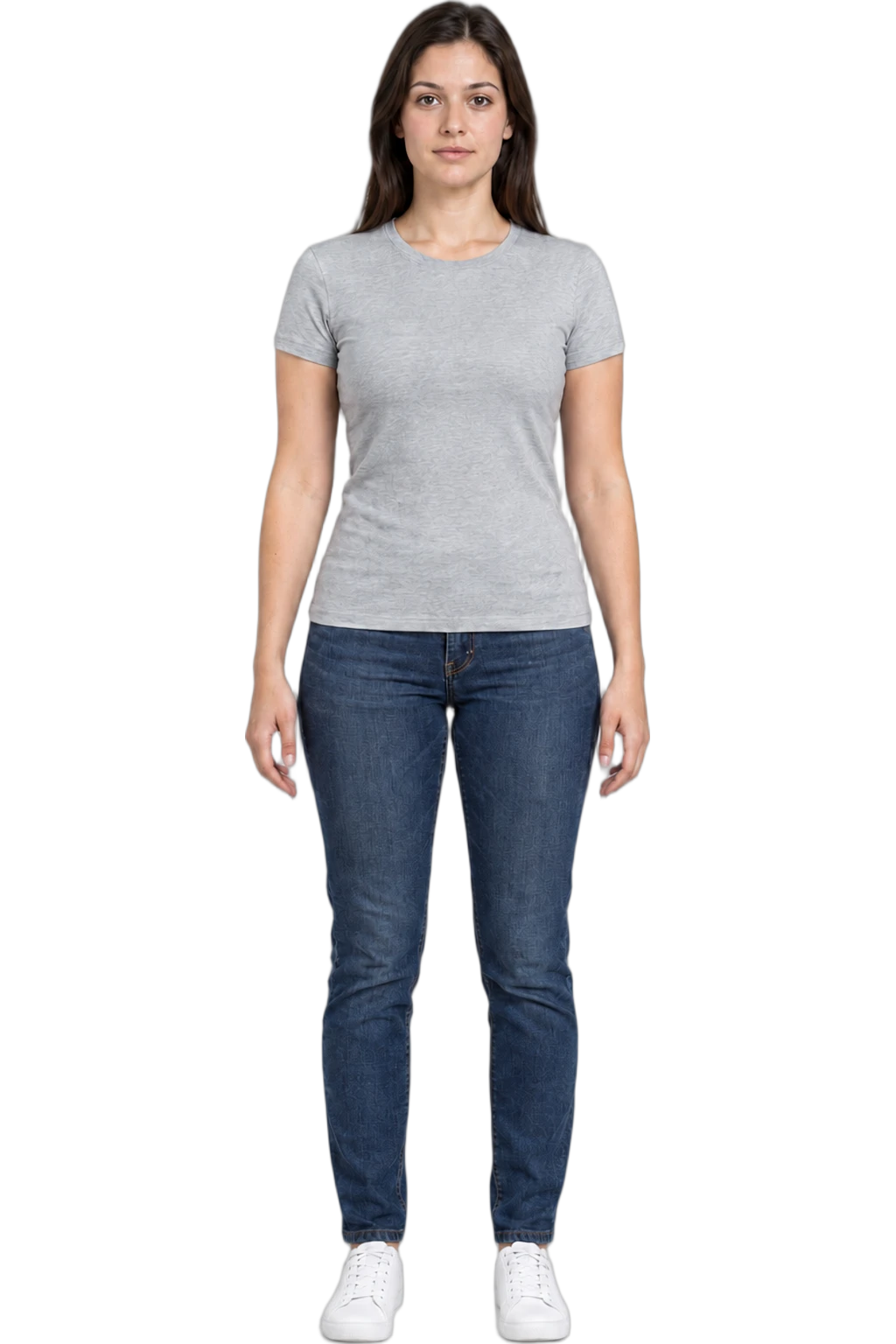
Before: synthetic demo avatar
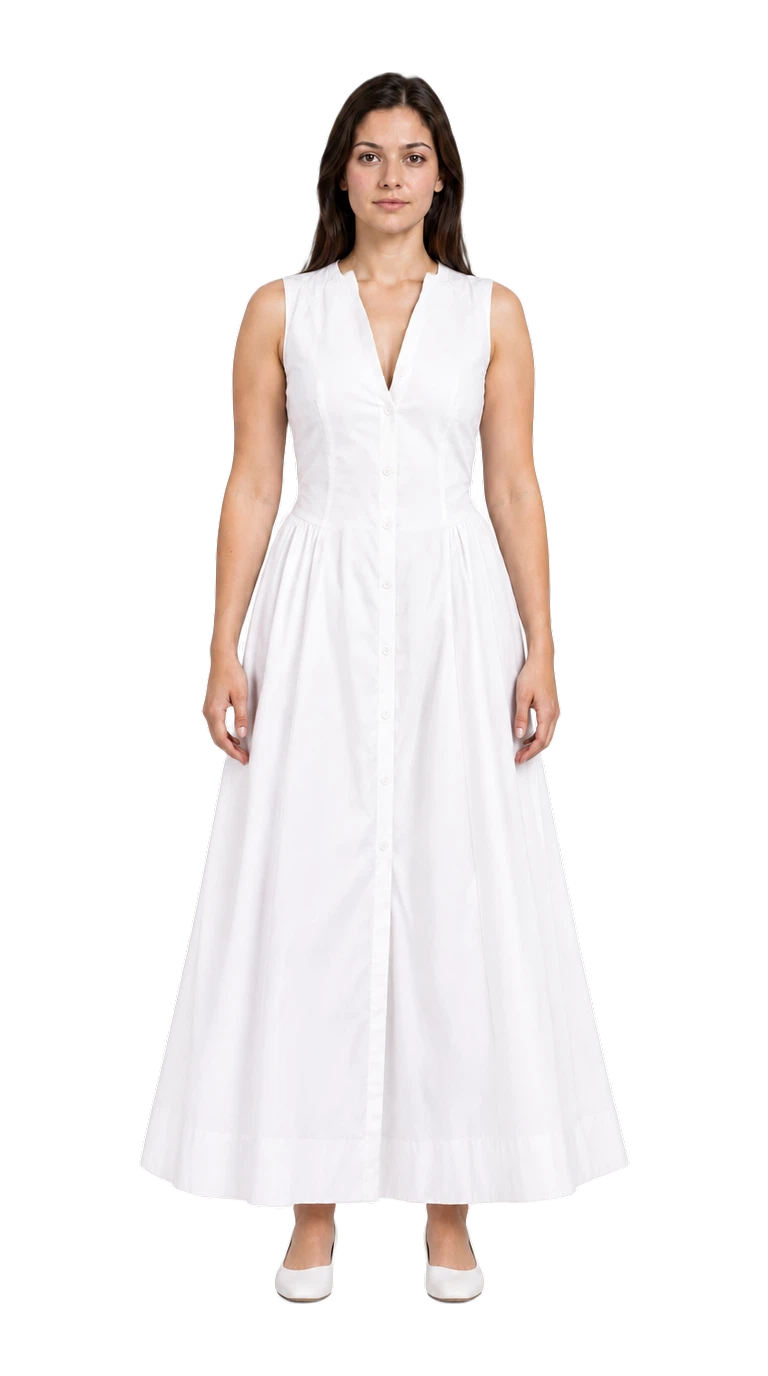
After: actual nista output
A separate fast-mode test of Aritzia's Cyrus baseball hat returned an image without the hat. The dress example should not be treated as proof that every Aritzia garment or accessory works. Live extension controls were not tested in this check.
How to try on Aritzia items with nista
- Install nista and create your avatar. Follow the installation guide, then complete the photo setup in nista.
- Shop Aritzia in Chrome. Open aritzia.com and go to a product page.
- Use the try-on control when available. Select the intended garment and inspect the result.
- Try similar cuts side by side. If a style comes in several fits or lengths, try each one to see which silhouette you prefer.
- Check the size guide. Open the size and fit information on the product page and compare it with your measurements before you order.
Why Aritzia's in-house brands reward comparing fits
Aritzia sells clothing under its own family of in-house labels, and each label tends to have its own design point of view. In practice that means you'll often see similar pieces (a trouser, a blazer, a knit) offered in several cuts, lengths, or rises across those labels. Reading a product description won't always tell you how two similar options differ on your body.
A virtual preview can help you explore an appearance, but it does not measure hem placement, rise or shoulder fit. Compare the actual garment dimensions and construction before choosing a size. For trousers and denim specifically, our guide on how to find jeans that fit walks through what to compare.
Aritzia shopping and fit tips
- Read the fit description on each product page. Look for notes on the intended fit (relaxed, fitted, cropped), the rise, and the inseam or length where listed.
- Check the model's size and height if shown. It helps you translate the product photos to your own height.
- Don't assume one size works across labels. Because each in-house label can be cut differently, check the size guide for each item rather than reusing your last size. See how to know if clothes will fit online.
- Look at fabric and care details. Stretch, drape, and thickness affect how a piece sits, and a try-on can't tell you how a fabric feels.
- Think in outfits, not single items. If you're building a set of core pieces, try each one and picture how they'll work together before you buy. Our capsule wardrobe guide can help you choose.
- Review the return terms on Aritzia's site before ordering multiple sizes, since policies can change.
What a virtual try-on can and can't tell you
nista describes its previews as keeping your proportions, but our example above also shows why a generated image must be checked against the original product photo. Use it for visual exploration, not a measured fit prediction. Fabric feel, stretch, construction and the size you should order still require product information and your own measurements. Read how accurate is nista for the general limits.
Try on your next Aritzia piece
When you're choosing between a few similar cuts, seeing each one on your own proportions makes the decision easier. Make your free nista avatar and press "try it on" on your next Aritzia product page.
Frequently asked questions
Does nista work on Aritzia?
nista lists Aritzia as a shopping example. Our dated image-generation check below is not a guarantee for every product or a verification of live extension controls.
Is nista free to use on Aritzia?
Yes. nista is 100% free with no hidden paywalls or subscriptions; brands that partner with nista cover the cost.
Can nista help me choose between Aritzia's different fits?
It can show how each cut looks on your avatar, which helps you compare silhouettes; check the product page for each item's measurements and size guide.
Will a virtual try-on guarantee my Aritzia size?
No. A generated preview does not measure physical fit. Check your measurements against the size guide on the Aritzia product page.